Over the last decade, the Chromebook has solidified its place in the laptop space, tailored for people who want an inexpensive machine to browse the internet, handle email and Google Docs, and not much else. Convertible 2-in-1 Chromebooks that can be used as tablets are newer to the scene.
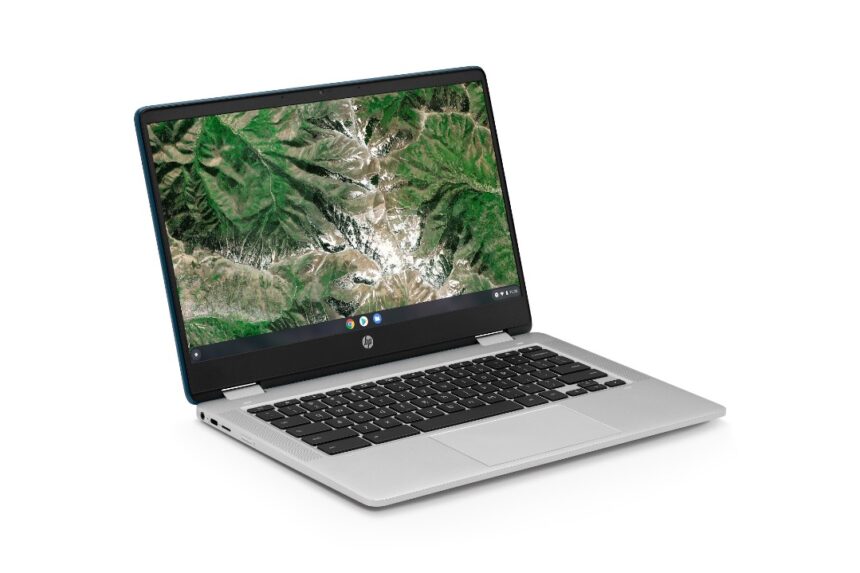
We’ve seen a handful of models launch this year, including excellent premium options like the $500-to-$600 Acer Chromebook Spin 514. But if you think that’s too much to pay for a Chrome OS convertible, enter the HP Chromebook x360 14a, a $330 hybrid that delivers zippy performance at a good price. A coarse display for its size, subpar speakers, and an imprecise touchpad limit its appeal compared with that Acer and other upscale Chromebooks, but it’s still worth checking out in its price range.
Wrapped in a clean metallic silver, the Chromebook x360 14a comes equipped with 4GB of RAM and 64GB of eMMC storage.
That’s close to the bottom of the barrel in terms of memory and storage, but sufficient for the cloud-based tasks that are the bread and butter of Chrome OS. Our review unit, model 14a-ca0022nr, functions as both a tablet and a laptop and makes use of an Intel Pentium Silver N5000, a quad-core budget CPU found in many low-cost laptops.
This Pentium isn’t what you’d call a proficient processor, though it does outclass its even cheaper Celeron cousins, which staff the very cheapest Chromebooks alongside low-end chips from the likes of MediaTek. The 1.1GHz chip delivers surprisingly snappy performance for the HP x360 14a, but you can opt for some extra horsepower by grabbing a model with a Pentium Silver N5030.
No matter the chip configuration, you’ll be making use of Google’s Chrome OS and spending time with Gmail, Google Workspace, Google Play, and YouTube. It’s all sufficient for casual internet users, especially those already indoctrinated into Google’s software infrastructure. Android equivalents of many popular programs are available in the Google Play Store as apps or extensions, so you should be able to match the functionality of a budget Windows laptop with just a few downloads.
The Chromebook x360 14a weighs in at 3.3 pounds, fairly standard for a 14-inch laptop though somewhat hefty if you’re considering folding the keyboard back and holding the device as a tablet in one hand. For comparison, the Asus Detachable Chromebook CM3 only weighs about 1.12 pounds, though the key word there is “detachable”: A tablet without its keyboard is always going to weigh less than a larger laptop. When in use, the HP’s 0.7-by-12.8-by-8.7-inch (HWD) frame is what you’d expect from a 14-inch notebook, though the rounded corners give it a more compact look.
The HP Chromebook x360 14a came out on top, but the rest of the pack wasn’t far behind. Any of these laptops is more than capable of handling a student’s word processing and web browsing needs.