The Dell Inspiron range has been a cornerstone of the affordable laptop market for some time being popular with students and those on a budget. It’s why the standard Inspiron 14 features.
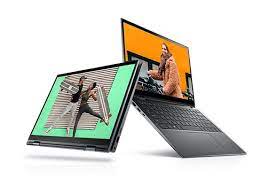
Hybrid laptops, or 2-in-1 machines span a wide range of models, from basic Chromebooks through to ultrabooks. They provide not only a regular laptop experience but also, by flipping the screen back all the way, a tablet format with the keyboard hidden.
The hinge also allows you to set it into a tent-like position or (with the keyboard flat against the desk) a freestanding monitor.
This adaptability makes them popular options for the home and for office. This combination of a 360-degree hinge and a touchscreen display means that these models cost a little more than their regular laptop version though.
The Dell Inspiron 14 2-in-1 7415 is available now, starting at £679/$799.99, with the Ryzen 7 5700U processor, 16GB of RAM and a 512GB SSD is priced at £898/$999.99. The machine is also now available with the brand new Intel Core 11th gen processors from as little as £763/$649. This unit came with Windows 10 Home edition, but Dell will be offering a free upgrade to Windows 11 when it is available later this year.
It has decent color and videos look fine on the 14-inch Full HD touch display with thin edge bezels, but it lacks brightness. We measured it at a maximum brightness of 200 Cd/M2, which is the base level we would consider acceptable. Working outside on a sunny day it was just visible in shadow, but you couldn’t make much out in direct sunlight. That’s disappointing, especially for a 2-in-1 system that is designed to be carried around and used like a tablet.
Above the screen is a small webcam with a sliding shutter. Slide the small switch over, and a physical piece of plastic slides over the webcam. That’s all contained inside the screen bezel so it isn’t going to break off.
That’s a nice touch for educational users or those who just want to keep things private.
No pen is included, but the touch screen is compatible with the Dell Active Pen PN350M.
This attaches to the top lip of the lid with magnets, so you aren’t likely to lose it.
The case feels well-constructed, and the hinge that allows the screen to rotate into tablet mode feels pretty tough – it should stand up to knocks and bumps without issue. The keyboard isn’t great, though, with a flat, mushy feel and a bit more give than I like. If you are a keyboard basher like me, the whole keyboard flexes slightly when you are struck by inspiration and start hammering away on it. I don’t expect laptop keyboards to feel as robust as the mechanical keyboard I use as a daily driver, but the more expensive cousins of the Inspiron 14 have a better, more robust feel. They don’t feel like they are going to buckle when the muse is with me and I am bashing away in a poetic frenzy.
One nice touch is the inclusion of a combination standby button and fingerprint reader in the top right of the keyboard, which is becoming standard fare on mid-range laptops. For those who have inquisitive children or co-workers, that’s a definite plus as a simple way to control who can log on. Just touch the button to put the device in standby mode when you walk away to make a cup of tea, then touch the button to turn it on and log on when you return.
The touchpad is large and responsive, with a nice mechanical click when you press down. It supports up to 10 touches, so you get all of the standard multi-touch features, like two-finger scroll, three finger touch and flick up to see all running programs, etc. It did pick up the odd wrist touch, though, mistaking that for a finger click when I rested my palm on the edge of the touchpad.
The Inspiron 14 has decent battery life, lasting just over 11 and half hours start playing games or doing any serious work and that’s going to be significantly less. It will still be more than adequate for most uses, though, and should get you through a day of work or college note-taking.